The free wedding vendor payment tracker
Ten vendors, two payments each, twenty dates. This is the spreadsheet that stops one of them being missed.
A wedding budget tells you what things cost. It doesn’t tell you that the florist’s balance was due last Tuesday. Most couples sign eight to twelve contracts, each with a deposit and a final payment on its own schedule, and the tracking lives across a pile of email confirmations. This spreadsheet puts all of it on one screen and does the arithmetic.
Download the tracker
.xlsx — works in Excel, Google Sheets, Numbers and LibreOffice.
⬇ Download free — no email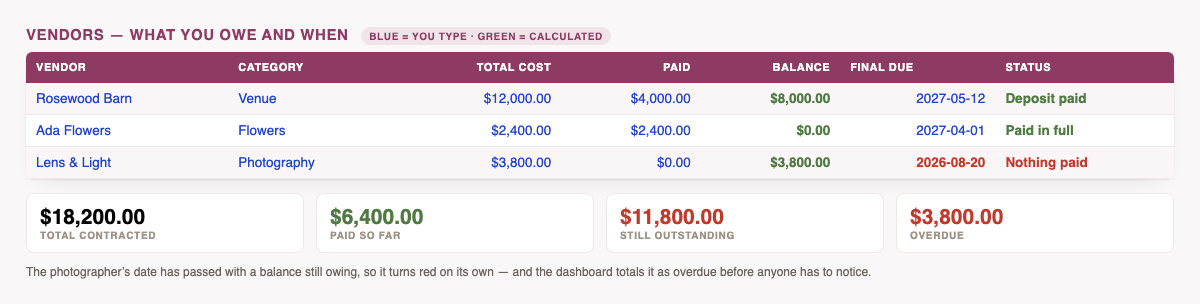
What it works out for you
- Balance due, per vendor — type the total and what you’ve paid; the rest is a formula.
- Status, automatically — Nothing paid, Deposit paid, or Paid in full. You never set it by hand.
- Overdue dates turn red the moment they pass while money is still owed.
- Due in the next 30 days — both the count and the amount, so you know what to have in the account.
- Totals that reconcile: contracted, paid, outstanding, and percent paid.
- Fourteen categories with contracted and outstanding broken down across each.
- Contact column, because the moment you need to chase a payment is the moment you can’t find the email.
The one habit that makes it work: fill in the row the day you sign, not the day you pay. The deposit and the final due date are both in the contract you just signed — thirty seconds then saves the frantic search later. Everything else in the sheet updates itself from those two dates.
The columns
| Column | Who fills it | What it’s for |
|---|---|---|
| Vendor | You | The business name on the contract. |
| Category | You (drop-down) | Drives the category breakdown. |
| Contact | You | Email or phone, for when you need to chase. |
| Total cost | You | The full contracted price. |
| Paid so far | You | Deposits and instalments added up. |
| Balance due | Formula | Total minus paid. Don’t type over it. |
| Deposit due / Final due | You | Straight off the contract. Drives every warning. |
| Status | Formula | Nothing paid / Deposit paid / Paid in full. |
| Notes | You | Payment method, who signed, what’s included. |
How to use it in Google Sheets
Download the file, then in Google Sheets choose File → Import → Upload. Formulas, filters and drop-downs carry across. In Excel or Numbers, just open it.
Common questions
Is it really free?
Yes — no email gate, no sign-up. These same trackers sell for a few dollars elsewhere; this one doesn’t.
Why did my balance column go blank?
Rows with no total cost stay blank on purpose, so an empty sheet doesn’t fill up with zeroes. Enter a total cost and the row comes to life.
Can I track more than 40 vendors?
You can add rows, but you’ll need to extend the Dashboard formulas past row 47 to include them.
Is my vendor information sent anywhere?
No. It’s a file on your computer.
The rest of the free set: the budget spreadsheet, the guest list template, the planning checklist, and the RSVP calculator.
And for afterwards: the gift & thank-you tracker.
See all six free wedding spreadsheets in one place.