Free wedding gift & thank-you tracker
Log every gift as it arrives. See at a glance who still hasn’t been thanked — and who’s been waiting longest.
Gifts don’t arrive in a tidy batch. They turn up at the shower, in the post, at the reception, and from people who couldn’t come at all. Two weeks later nobody can remember whether Aunt Sara’s vase was ever acknowledged. This is a spreadsheet that remembers for you, and quietly counts the days.
Download the tracker
.xlsx — works in Excel, Google Sheets, Numbers and LibreOffice.
⬇ Download free — no email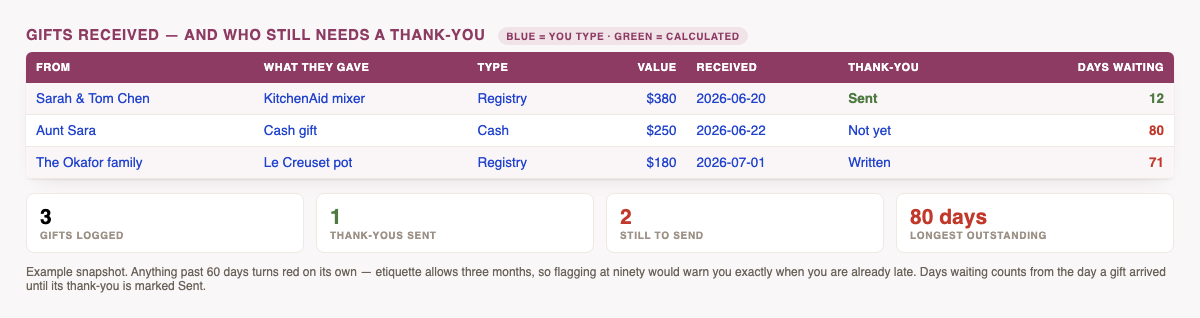
What it does for you
- Days waiting, calculated. From the day a gift arrived until its thank-you is marked Sent. Anything past 60 days turns red on its own.
- Progress you can actually see — gifts logged, thank-yous sent, still to send, percent done, and the longest-outstanding gift.
- An address column, so the same sheet doubles as your envelope list instead of sending you hunting.
- Cash and value totals — total cash gifts, total value, average gift, and a breakdown by type.
- Filters on every column, so “show me everyone I still owe a note” is one click.
- 200 rows, drop-downs for gift type and status, and one example row to type over.
Why 60 days and not 90? The usual etiquette is within three months of the wedding — and two weeks for gifts that arrive early. Flagging at ninety would mean the warning arrives exactly when you’re already late. Sixty gives you a month of warning while it’s still comfortably on time.
The habit that makes it work
Log the gift the day it arrives, not the day you open the box properly. Name, what it was, and the date — fifteen seconds. Everything else the sheet works out. The couples who end up apologising six months later are almost never disorganised people; they just never wrote it down while it was in front of them.
How to use it in Google Sheets
Download the file, then in Google Sheets choose File → Import → Upload. Formulas, filters and drop-downs carry across. In Excel or Numbers, just open it.
Common questions
How long do I really have?
Within three months of the wedding is the common guidance, and about two weeks for anything that arrives beforehand. Sooner is kinder.
Why is “days waiting” blank on empty rows?
Deliberately — a row with no gift and no date shows nothing rather than a misleading zero.
Can I use it for a shower or engagement party too?
Yes. Nothing in it is wedding-specific except the wording. Log the date and it behaves the same.
Is anything I type sent anywhere?
No. It’s a file on your computer.
Part of the free set: the budget spreadsheet, the guest list template, the planning checklist, the vendor payment tracker — or see all of them together.