The free wedding guest list template
RSVPs, plus-ones, meal choices and table numbers — one row per household, everything else adds itself up.
Most guest list templates are just a printable grid: nice to look at, useless the moment your caterer asks how many people are having the fish. This one does the counting. You fill in names and replies; the spreadsheet tells you your headcount, your response rate, your meal totals and how full each table is.
Download the guest list template
.xlsx — works in Excel, Google Sheets, Numbers and LibreOffice.
⬇ Download free — no email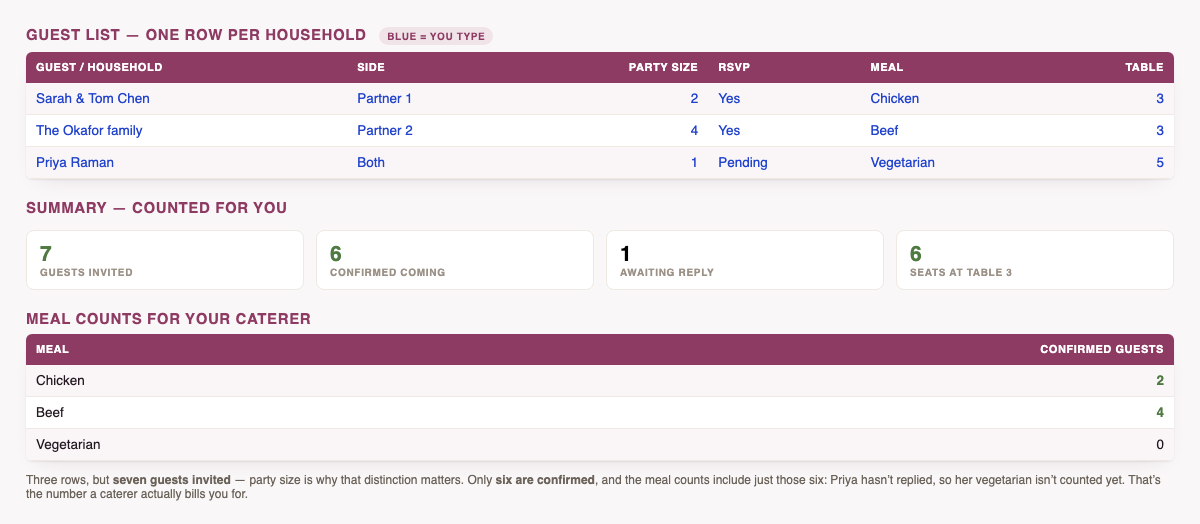
What's inside
- Guest List — 300 household rows with drop-downs for side, RSVP and meal. Replies turn green for yes and red for no as you enter them.
- Summary — households invited, total guests including plus-ones, confirmed, declined, still waiting, and your response rate as a percentage.
- Meal counts — chicken, beef, fish, vegetarian, vegan and kids, counted from confirmed guests only. This is the block you send your caterer.
- Tables — 25 tables showing seats used, so an over-capacity table shows up before the place cards are printed.
- One example row in blue showing the expected format. Type straight over it.
Why one row per household? Because that's how invitations go out. A couple with two children is a single row with a party size of four — you send one invitation, you get one reply, and your headcount is still right. Tracking people individually means four rows, four RSVP cells to keep in sync, and a guest count that quietly drifts.
The columns, and what each one is for
| Column | What to put in it |
|---|---|
| Guest / household | The name as it appears on the envelope — "Sarah & Tom Chen". |
| Side | Partner 1, Partner 2, or Both. Useful when you need to trim the list evenly. |
| Party size | How many people that invitation covers, including plus-ones and children. |
| RSVP | Yes, No, Pending or Maybe. Everything on the Summary tab keys off this. |
| Meal | Their choice. Feeds the caterer counts. |
| Table | A number, once you get to seating. Feeds the Tables tab. |
| Notes | Dietary needs, travelling from out of town, needs a hotel — anything you'll otherwise forget. |
How to use it in Google Sheets
Download the file, then in Google Sheets choose File → Import → Upload and drop the .xlsx in. The formulas and drop-downs carry across. In Excel or Numbers, just open it.
Not sure how many to invite yet?
Work out the headcount first. The RSVP calculator estimates how many of your list will actually show up — using separate rates for local and out-of-town guests, because that difference is what actually moves the number — or works backwards from the seats you need to fill.
A sane order to work through it
- First pass: names and party sizes only. Leave RSVP on Pending. Now you have a real headcount to give the venue.
- After invitations: update RSVP as replies come in and watch the response rate climb. Anything still Pending three weeks out is a phone call.
- Two weeks out: fill in meals and send the caterer the Summary block.
- Last week: assign table numbers and check no table is over capacity.
Prefer to do it in the browser?
The same tracker runs as a web tool — nothing to download, and your list stays on your device.
Use the web version instead
RSVP and meal tracking with CSV export, no file to manage.
Open the free guest list tracker →Common questions
Is it really free?
Yes — no email gate, no sign-up, no payment, nothing to unsubscribe from later.
Will the meal counts include people who haven't replied?
No, and that's deliberate. The counts only include guests marked Yes, because that's the number a caterer bills you for. Pending guests show separately on the Summary tab so you know how much the number could still move.
Can I add more rows or columns?
Yes. It's your file — though if you extend past row 307 you'll need to stretch the Summary formulas to match.
Is my guest list sent anywhere?
No. It's a file on your computer. Nothing is uploaded, by us or by the spreadsheet.
Next: work out how much a wedding actually costs for the headcount you just landed on, grab the free budget spreadsheet, and check what you should be doing this month.
Also free, no email: the vendor payment tracker — deposits, balances and due dates across every vendor, with overdue payments flagged automatically.
And for afterwards: the gift & thank-you tracker.
See all six free wedding spreadsheets in one place.